Security Error on Transport Layer - Windows 10
Problem
The latest Update for Windows 10 has caused some issues with RDP and saved credentials. This issue usually presents itself as a pop-up error stating that a security error occurred on the transport layer (fig 1).
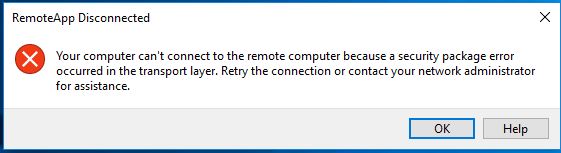
Fig 1
Solution
If you are receiving this error then you will need to connect to journease using a different App on windows 10
Follow the below Instructions to set up.
- Delete your old Journease icon
- Open Control Panel (use
 ) and type Control, then press Enter
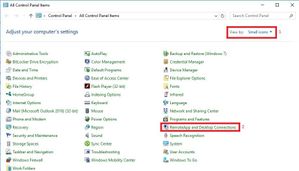
 - In the top right of the Control Panel ensure that View by: Small icons is selected (Fig 2)
- Click on RemoteApp and Desktop Connections to open the software
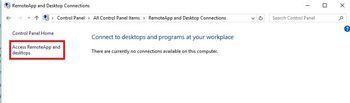
- On the left hand side of the new window click on Access RemoteApp and desktops (Fig 3)
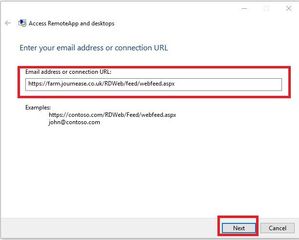
- In the next window copy and paste the text from 6a into the box under Email address or connection URL and click Next (Fig 4)
- https://farm.journease.co.uk/RDWeb/feed/webfeed.aspx
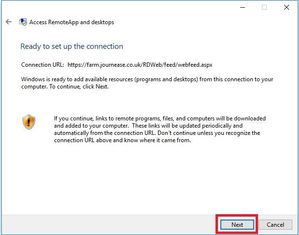
- Click Next again (Fig 5)
- You will now be asked to enter your log on credentials. This will be your account name (e.g. journease\account01) and password (Fig 6)
- Tick the Remember me box
- Click OK
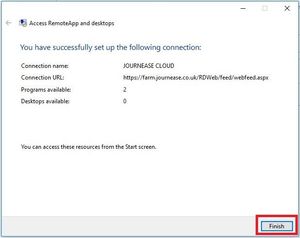
- Once the program has finished setting up click Finish (Fig 7)
- Open your start menu. At the top you should see the Journease icon
 , Hold Left Click and drag to your desktop - this is now your icon to access Journease
 - In some cases when you click on this icon you will still get the error message, however if you click ok and then double click the icon it will then log you in.
Fig 2
| Fig 3
| Fig 4
|
Fig 5
| Fig 6 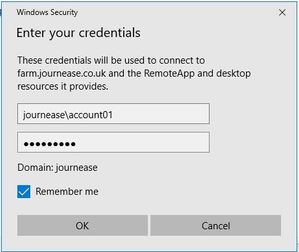 | Fig 7
|
Related articles